Google For Business

A simple and secure way to manage your devices
Google Chrome Enterprise Upgrade provides a simple and secure way to manage your ChromeOS devices in the admin console. It unlocks the built-in business capabilities of Chrome OS for IT to secure, orchestrate and power the cloud workforce. Its advanced security keeps corporate data safe, ensure flexible access to resources regardless of use case, and simplifies the orchestration of Chrome devices and other critical infrastructure.
Stay connected and organized with easy-to-use phone solution
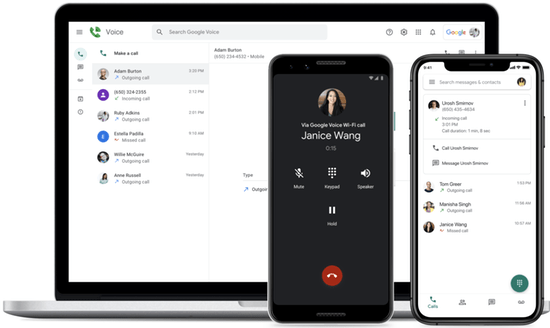
Google Voice is a voice over Internet protocol (VoIP) phone service that uses the Internet to make and receive phone calls, as well as send text messages. It gives you a phone number for calls, texts, and voicemails. You can use this number to make domestic and international calls from your web browser and mobile devices. If you're in the US or Canada, you can choose your own number. Your organization can also assign you a Google Voice number.
A collaborative, digital whiteboard built for the cloud
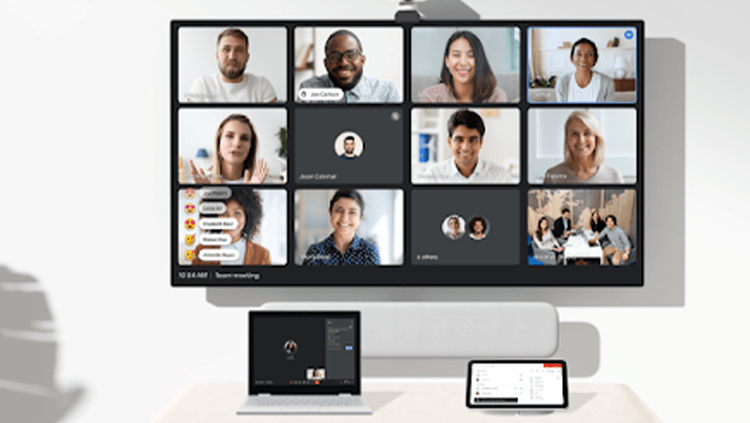
Jamboard takes the whiteboard to the cloud, delivering a collaborative experience designed to unlock your team’s creativity, in real-time, from anywhere. You can share a jam session with collaborators whether they are on a Jamboard device, mobile app or web browser. People in up to 50 user sessions can work on a jam at once.
Collaborate with any device:
-Create, edit, and share jams from your phone, tablet, or computer.
-Open a jam on a nearby Jamboard from your phone or tablet.
-Connect your computer to Jamboard device. Jamboard displays your screen and lets you control the computer from the board’s touchscreen.
-Pick up where you left off earlier or email your jam session when you finish.

Starting at $5,000
Secure data from Google's cloud & managed by a web control centre
Google provides platform protection for Google Workspace - but ransomware, user mistakes, malicious behavior, and sync or configuration errors all threaten an organization’s productivity. Ensuring business continuity can be difficult and risky if IT staff rely on native protection since this is not only limited but also complex and time-consuming to manage. Organizations have a responsibility not only to protect critical data in Workspace but also to comply with regulations. You can address these challenges by backing up data in Google Drive and Gmail directly from Google’s cloud to the Redstor cloud. starting at $2.00 month
Productivity and collaboration tools for all the ways we work
Google Workspace (formerly known as G Suite) is a collection of cloud computing, productivity, and collaboration tools, software, and products developed and marketed by Google. It consists of Gmail, Contacts, Calendar, Meet and Chat for communication; Currents for employee engagement; Drive for storage and the Google Docs suite for content creation. An Admin Panel is provided for managing users and services. It adds enterprise features such as custom email addresses at a domain; an option for unlimited Drive storage, additional administrative tools, and advanced settings, as well as 24/7 phone and email support. Starting at $5.00 month
Secure and optimize your contact center with ChromeOS
ChromeOS, a cloud-first operating system and a leading modern contact center platform, keeps your business on the cutting edge of technology. With ChromeOS, contact centers can provide seamless access to business-critical tools with shareable, easy-to-deploy ChromeOS devices that enable agents to provide best-in-class service to customers. It minimizes business costs by reducing deployment times, upgrade costs, support costs and agent training costs with centralized solutions. Additionally, it protects customer data, agents and business information with built-in intelligent security.
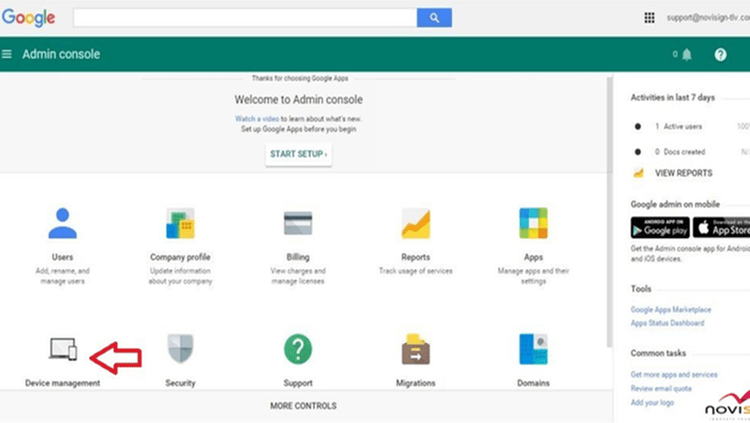
Configure chrome device settings in the google admin console
As an IT admin for a business or school, you can manage Chromebooks and other Chrome devices, from a cloud-based Admin console. You can enforce policies, set up Chrome features for users, provide access to your internal VPNs and Wi-Fi networks, force install Chrome apps and extensions, and more. Each Chrome Enterprise device comes with its Upgrade, so you don’t need to purchase upgrades separately. Devices include Chromebook Enterprise, Chromebox Enterprise, and Chromebase Enterprise.

In today’s fast-paced business landscape, effective communication and collaboration are essential for success. Google Workspace, formerly known as G Suite, offers a powerful suite of cloud-based tools designed to streamline work processes, enhance productivity, and facilitate collaboration within organizations. In this guide, we’ll explore the key features of Google Workspace and provide a comprehensive training plan to help you and your team harness the full potential of these tools.

What is Google Workspace?

Google Workspace is a collection of cloud-based applications developed by Google. It includes popular tools such as Gmail, Google Drive, Google Docs, Google Sheets, Google Slides, Google Calendar, and more. These applications are designed to work seamlessly together, enabling teams to communicate, collaborate, and manage projects efficiently.

  • Collaboration: Google Workspace allows multiple users to work on documents, spreadsheets, and presentations in real-time, making teamwork more efficient.
  • Mobility: Access your work from anywhere, on any device with an internet connection.
  • Security: Google Workspace provides robust security features, including data encryption, two-factor authentication, and regular updates to protect your information.
  • Productivity: Features like Google Drive’s search functionality and Google Calendar’s scheduling tools help you stay organized and get more done.
  • Integration: Google Workspace seamlessly integrates with other popular business applications, such as Microsoft Office and project management tools.

By investing time in training and effectively utilizing Google Workspace, your organization can optimize productivity, streamline communication, and stay competitive in today’s dynamic business environment. Embracing these tools can lead to improved collaboration, efficiency, and overall success.

Google’s suite of products and services. These consultants possess in-depth knowledge of Google Workspace, Google Ads, Google Analytics, and other tools. They can:

  1. Optimize Efficiency: Google consultants can streamline workflows and business processes using Google Workspace, increasing productivity and saving time.
  2. Enhance Online Presence: They are skilled in Google Ads and SEO, helping businesses rank higher in search results, reach a wider audience, and drive more traffic to their websites.
  3. Data-Driven Decisions: Google consultants use Google Analytics to gather insights, enabling data-driven decisions that improve marketing strategies and customer experiences.
  4. Cost Savings: By effectively managing ad campaigns and resource allocation, they can reduce advertising costs and improve ROI.
  5. Customized Solutions: Consultants tailor Google tools to meet specific business needs, from collaboration to data analysis, ensuring maximum value.
  6. Expertise in Updates: They stay updated with Google’s ever-evolving products, ensuring businesses remain competitive with the latest features and strategies.

Article by Secret Tips

# ALEXA Quantcast       Builtwith

#builtwith #whoistools #alexa #quantcast #backtalk #whois.com

#talkreviews #statshow #whois #siteworthtraffic #analytics #hqindex

#setprice #semrush #infositehow

Leave a comment